HOME > FAVOURITE SOFTWARE

HOME > FAVOURITE SOFTWARE

Over the years I've got together a great set of programs that work well for me. I don't use software that's bloated or full of bugs and I think that's why I have such a stable set-up.
Sometimes the things I value most are those handy little free utilities... There is some great freeware/open source software around these days and inexpensive shareware. Though I use a handful of expensive products too.
Anyway, here's my list of favourites. A yellow star means it's something really 'top' that I use just about every day.
This page hasn't been updated for a number of years.
SnapFiles: a huge collection of shareware and freeware.
A+ FreeWare Home: quite a few programs that I haven't seen listed elsewhere. Good, easy-to-use site.
FreeWare Home: an archive of free software.
FileHippo: another good archive.
TinyApps.org: a guide to very small software for your PC. Virtually all of the programs listed are free of charge and for use with Windows.
VideoHelp: a good place to find video-related software.
OldVersion.com: an archive of old versions of popular programs, such as MSN Messenger, Acrobat Reader, Windows Media Player and many more. 'Because newer is not always better'. Very true...
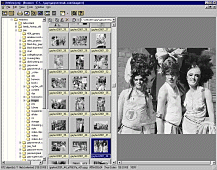
XNView: (shown below) this is a freeware image management and processing program which I began using mainly to download images from my digital camera. Not quite in the same league as Thumbsplus, but definitely worth a look and very nice for free.
 Thumbsplus:
image processing and management with a database system, TWAIN scanning, screen
capture. Ideal for fast resizing and processing when building web pages. It costs
$75. I try my best to run my business 'paperless' with most documents stored as
scans on disc. So I use Thumbsplus as a kind of electronic filing cabinet.
Thumbsplus:
image processing and management with a database system, TWAIN scanning, screen
capture. Ideal for fast resizing and processing when building web pages. It costs
$75. I try my best to run my business 'paperless' with most documents stored as
scans on disc. So I use Thumbsplus as a kind of electronic filing cabinet.
PhotoScape:
free graphics software. The filters section is particularly worth a look. It has
effects for creating an 'antique' look, darkening skies and some above-average
art effects.
Pixia: good for drawing with my graphics tablet. Lines are silky smooth and I can create something that looks like a real pencil drawing. Pixia includes layers, transparency and various tools, though not an airbrush. I've listed some other free painting programs here.
S7Raw: nice free software for working with RAW image files from Fujifilm FinePix digital cameras.
Url2BMP: free screen capture software for web pages. Just visit the web page using the built in browser. It then saves the entire page as a BMP, JPG or TIF image as soon as it has loaded completely. Some refinements are promised in the new version which is coming soon.
The Gimp: impressive free graphics software that is available for Linux, Mac and Windows. This is the nearest you'll get to Photoshop without spending any money. Like any feature-packed software, The Gimp takes a bit of getting used to, but it's time well spent. Particularly smooth for painting and drawing and some great art effects. Plus the latest Windows version now supports my graphics tablet. Text remains a weak spot when compared to Photoshop.
Fireworks:
I use this to make and compress animated GIFs. The text effects are good. But,
overall, it's not as enjoyable to use as Photoshop and a bit of a memory hog with
large images. Best suited to working on small web-sized graphics I think.
JPG Optimizer: (I use v2.02) this allows compression to be varied within one JPG image. So, different areas can be compressed more or less. There's an 'extra colour' option, which is useful for boosting red areas (which often suffer in JPGs). I don't use this for all my images, just those that need special treatment.
Adobe
Photoshop: image manipulation and processing. What can I say? Just a superb
piece of graphics software.
FastStone
Capture: this screen grabber can grab in many different ways, including an
irregular shape and the full-length of a web page by scrolling it. I like to keep
grabs of the web pages I design, so this is ideal. Free for non-commercial use.
CaptureEzePro: pay software that can also scroll a web page as it grabs.
PaintShopPro: good for text effects and I like the picture tube tool. But I'm not keen on the clunky interface.
Adobe Illustrator: I use this occasionally for text effects.
FastStone Image Viewer: nice free image browser, converter and editor.
FotoSketcher: turns photographs into artwork. The results from Fotosketcher are a step up from similar software and it's free.
Vuescan: fairly specialist scanning software that I use with my Acer Scanwit film scanner. But it works with many flatbeds too, with lots of control.
MP3 Direct Cut: chop, combine, add fades and adjust the volume of MP3 files without any loss of quality (no re-encoding is involved) using this free tool.
MP3 Cutter: another great free program for chopping and combining MP3 files without any loss of quality (there is no re-encoding). I use this to edit MP3 recordings made with my Zoom H2 audio recorder. A minor issue I've had (in Windows Vista) is that when I load a new MP3 into the cutter area it resets the volume in the Windows mixer to zero. But that's a minor quirk.
MP3
Audio Mixer: just like a multi-track tape recorder. Put effects or music on
different tracks, mix them down... Useful for radio, DJs or soundtrack building.
Shareware ($24.95 to buy).
ClubSceneUKDJ: this is funky freeware for mixing audio 'live' and is primarily aimed at music. Mix tracks manually or on auto, talk over, play sample ('jingles') import Winamp playlists and store loads of lists in the system, does Karaoke lyrics too and can flash up messages on screen to co-incide with record requests. Useful for club nights or Internet radio shows. Very cool! Sadly the website seems unavailable now.
Audacity:
nice free (open source) audio recorder and editor. Available for Windows, Mac
and Linux. Used by lots of podcasters I hear. I'm impressed!
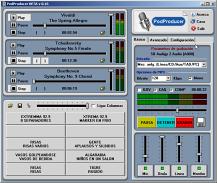
PodProducer: (shown above) free software to record, mix and tag your podcast. It includes virtual playing decks and buttons for effects and jingles.
Audio
Level Meter: this 'must-have' free meter lets you set the level accurately
when recording audio through your PC soundcard. It can be set to display a traditional
'bargraph' VU meter or the BBC-style PPM with a moving needle. Terrific.
Skype: free software for making internet telephone calls. Calls to standard telephone numbers cost a few pennies/cents per minute. Works best with a headset or a USB handset. There are some issues with it using your PC's processor and bandwidth when you aren't actually making a call. So I start up Skype only when I need it.
Google Talk: similar to Skype and worth trying out as an alternative.
Dreamweaver:
I used to hand code
all my pages in a text editor until Dreamweaver came along. It can't be beaten.
Dreamweaver has good site management tools which  make it easy to update pages
across even a huge site. Currently using version 8.
make it easy to update pages
across even a huge site. Currently using version 8.
Arles Image Web Page Creator: ideal for building image galleries. Arles can do just about everything -- it makes thumbnails, resizes images and watermarks them if required and even adds banners to pages.
NVU: a 'Web Authoring System' that aims to rival Dreamweaver. It isn't quite there just yet, particularly if you need to manage a website with many pages, but it provides more than enough features for basic use. Free and available for Linux, Windows and Mac.
ColorMania:
a handy free colour picker tool.
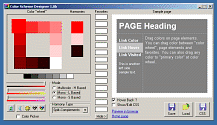
Color Scheme Designer: (above) if you've ever struggled to put together a good colour scheme for a website, this free tool is for you.
Spamproofer: this small freeware tool encodes any e-mail address you want to put on a web page, so spiders can't pick it up and add it to mailing lists.
TextPad:
an excellent text editor which I use daily. Lots of features, including a sophisticated
search and replace system that can be used on multiple documents at once or on
selected text. TextPad can also search in files that aren't open (an entire folder
for example) and has a split-screen mode for two different views of one document.
There is a block select mode, which is good for manipulating columns of text in
a database.
RSS Builder: create RSS feeds for your web site with this cool free program.
EspressoWeb: it took me a whole day of searching to find this. It works like mail merge software, generating HTML pages from a template document and a database.
Fluid
Dynamics Software: check out these guys for the free Genesis web authoring
system which lets you edit your site from any browser and there is a search engine
for your site, which is shareware. Also available, the AXS
Visitor Tracking System, which is the best free CGI tracking script around,
in my opinion. Fluid Dynamics even have an auto-install system which will install
the scripts on your server for free and without you having to do anything technical.
VirtualDub:
super freeware software for video capture, processing, conversion, frame grabbing
and simple chopping up of AVIs. It has a good range of processing filters available,
which do everything from improving captures of ropey old VHS recordings and smoothing
out grain and noise, to adding logos and resizing. If you get version 1.3c or
earlier, it handles ASF files. Microsoft made the author remove this feature from
later versions, but 1.3c can be found on the 'net if you look hard enough (try here).
There are also a couple of modified versions of VirtualDub around. One includes
a timer for recording TV shows. Two others can import MPEG2. More info on those here.
MediaCoder: an 'all-in-one' solution for converting videos from one format to another. Check out the 'devices' menu for easy encoding for iPod or DVD. Open-source software (free).
Super:
similar to MediaCoder, Super is an impressive video converter and encoding program.
It's easy to use and free. You name it, this can probably do it! Terrible website
though, so you may find it easier to download from the 'mirror' link on this page.
Lame Front End:
a free graphical interface for the popular and very fast MP3 encoder & decoder - LAME. Well designed, easy-to-use and with advanced features that you can turn on if you wish.
GUI
For DVDAuthor: a free DVD authoring tool that lets you make really very sophisticated
discs. DVD Author doesn't do the video encoding, it makes the menu screens and
puts together the final DVD. I've tried a few of these -- including some pay software
-- and this is my favourite.
CamStudio:
a free tool for capturing a video (AVI or Flash) of your screen or a part of it.
Can capture the audio too if using Windows XP.
VideoLan: free open source video player. Plays everything including MPEG2, DVDs and MPEG4. It can also act as a server and client for streaming video.
FreeVCR: free video capture software. Includes a timer, which you can set to record TV shows.
Media
Player Classic: try this if you're tired of bloated and buggy media players.
It's small, fast and free but with many features which you won't find elsewhere.
Real
Alternative: don't want to install Real Player? Then try this. A much-smaller
and more-friendly free alternative based on Media Player Classic (above). It plays
just about all Real Audio and Video (not subscription services) and works a treat.
Quicktime
Alternative: play Quicktime without installing the official bloatware. Based
on Media Player Classic (above). Seems to work with everything including embedded
movies on web pages.
Codec
Pack: if you want to be able to play just about every format going, download
the K-Lite Mega Codec Pack (18Mb), which includes the player mentioned above and
loads of other good stuff.
AVIEdit: video capture and basic editing software with effects. Can be used to grab stills from live video and for time-lapse sequences. Very small but powerful. Shareware.
ASFTools: converts ASF/WMV files to different bitrates or to AVI.
Stoik Video Convertor: convert AVI, WMV, DV files in all possible combinations. Very useful! Older (free) versions also handled Quicktime. But that is only available in a pay version now.
Real Producer Basic: free software for converting videos to Real streaming media format. Lots of options are disabled in this free version and the files created are not backward-compatible with old versions of RealPlayer, which is rather annoying. But, hey, it's free.
Windows Media Encoder: free, fully working software for converting video to WMV format and for broadcasting (streaming) audio or video.
Womble
MPEG-VCR: this is the best tool if you need to edit MPEG 1 or MPEG 2 files.
It keeps the sound in sync, cuts to a frame and with the absolute minimum of re-encoding
(just around the edit points to maintain the MPEG2 structure). Ideal for cutting out ads from MPEG2 recordings
of TV shows. Shareware.
WinDV:
a great free tool for transferring DV footage to, or from, a camcorder. Small
and takes a minimum of system resources, has a preview window, no dropped frames,
can split the captured video into an AVI file for each shot with the date and
time of recording as the filename. Love it.
HDVSplit:
for transferring HDV video footage to, or from, a camcorder.
SMPlayer:
a great free media player.
ABC Videoroll: free video editing software.
Adobe Premiere 6: video editing software. Very like editing in a traditional film or video edit suite, with good facilities for mixing/dubbing soundtracks. But crashes often and I haven't touched it since I got Vegas Video.
Sony
Vegas Video: excellent video editing software which I can't praise highly
enough. Very stable. It includes great tools for colour adjustment, compositing,
titles and more... Now owned by Sony. Vegas doesn't yet have the 'snob' value
of other Non-Linear-Editors such as FinalCutPro. But, in fact, it does the same
thing and more. The audio facilities are terrific (probably because Vegas started
life as an audio editing program called Sound Forge). In fact, many people, including
myself, use Vegas to create professional-quality audio-only productions such as
radio shows and podcasts. Currently I'm using Vegas Pro 8.
Debugmode Frameserver: this free program lets you transfer video and audio data from one video editing application to another. For example, if you have a video project on the timeline in Sony Vegas, you can render it to the frameserver (which appears as a video codec). You then open the 'file' that is created in another video program -- in the video encoder software Super for example -- and save/render it there as normal. The frameserver pipes the video data from Vegas into Super. Thus you avoid having to make a large intermediate file in Vegas to load into Super. Debugmode Frameserver can receive data from Sony Vegas, Adobe Premiere, Ulead MediaStudio Pro, Ulead VideoStudio, Pure Motion EditStudio and DebugMode Wax. Not all applications accept the output from it but Super is one that does.
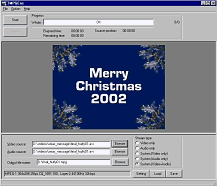
TMPGEnc: (shown below) a top quality MPEG encoder, chopper and combiner. Free for MPG1, shareware for MPG2. Also check out TMPGEnc DVD Author for making your own DVDs.
HuffyUV:
a lossless video codec. This lets you capture video without any loss of quality
due to compression. But gives a smaller file size than a standard uncompressed
AVI. It's fast and completely free. Useful for editing too, for situations where
DV may introduce compression artifacts (which are particularly noticeable on graphics).
If you need to render a piece of footage repeatedly for some reason -- to add
several layers of effects for instance -- then using a lossless codec such as
HuffyUV will prevent a build up of compression artifacts.
Lagarith Lossless Video Codec: an interesting alternative to HuffyUV which gives smaller files under certain circumstances.
Mainconcept
MPEG Encoder: in my opinion the best MPEG encoder, in terms of both speed
and quality. This is my encoder of choice these days. Costs EUR 133.61 / USD 169.00.
PicVideo:
Motion JPEG video codec. Very fast! Lets you capture full-screen 25fps or 30fps
video even on a relatively slow PC. Good for capturing analogue video (eg. VHS)
before converting to MPEG, especially if you are a bit short on drive space and
can't use HuffyUV for completely lossless captures. With MJPEG the amount of compression
can be varied to meet your needs. I use this a lot with VirtualDub (above). However,
MJPEG is not a good format for distribution as few people can play it and the
format is rather long in the tooth now. The PicVideo codec was available for free
for a while but now costs $28 for non-commercial use. Otherwise $99.
Flash: can be used for making animations for web pages. But I've always been more interested in making cartoon movies and this is certainly a lot more easy than doing it on film!
Riva
FLV encoder: convert videos into the Flash Video format with this free tool.
Flowplayer:
an opensource Flash video player for your website. Very nice and probably the
first decent completely free Flash player. I have an example of the code to make
a playlist here. Version 3 has become rather complicated and adds a logo while loading, so I'm still a fan of version 2.
Toon
Boom: various animation software and you can try before you buy.
FreeMind: did you ever make one of those bubble charts where you start off with a main idea in the centre of the page? I used them all the time in the days when I wrote articles for magazines. FreeMind is free software that does the same and, of course, it's far more flexible that writing down your thoughts on a piece of paper.
FreeOCR: free optical character recognition software with a high degree of accuracy. Columns can be selected by hand. Very usable but lacks drag and drop for image files.
TopOCR: another interesting free program for optical character recognition. At first glance this seems a little primitive (for example the loaded scan can't be zoomed, so always appears at full size). But in fact it has drag and drop, does an excellent job of automatically recognising columns and the text appears in a fully-featured text editor window. It claims to be able to OCR images from a digital camera. Compressed TIFF files aren't supported. Update (March 2011): another free program bites the dust. TopOCR is no longer available and has been replaced by SnapReader for $29.95.
OpenOffice: a multiplatform and multilingual office suite. Opensource, which means it's free.
Ubuntu (Linux): a complete Linux-based operating system, freely available with both community and professional support. This is really impressive and if I didn't need rather specialised Windows-based software such as Dreamweaver and Vegas Video, I would probably be using Ubuntu as my operating system. My friend D. has switched and I hope I can before Windows XP is phased out.
Blag (Linux): put together by the Brixton Linux Action Group, this is another good Linux distribution. For the first time I can see myself giving up Windows sometime soon! Blag has a suite of graphics, internet, audio, video, office, and peer to peer file sharing applications and just seems to work beautifully.
Pegasus Mail: this was my email program of choice for 14 years until 2010. It is still updated.
Sylpheed: nice email software that has finally tempted me away from Pegasus Mail (above). Sylpheed is available for Windows, Linux and Mac. It's easy to configure, secure and light on resources.
Opera:
As used here! This is the best alternative web browser and it's free. Turn off Java, Javascript, images, backgrounds, style sheets, frames,
GIF animation, plug-ins and pop ups at a click on on a site-by-site basis. Opera
is very disabled friendly and standards compliant. It has many useful features,
including its bookmarks system, built-in RSS feed reader and support for Bittorrent.
Opera has had tabbed browsing for years. It's a real mystery why more people don't
use it...Available for Windows, Linux and Mac.
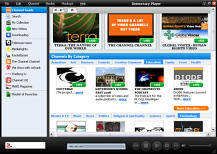
Miro: (shown below) watch thousands of online video 'channels', torrents and even YouTube videos with this free player. It does a great job of playing virtually all different video file formats including DivX and Quicktime (it's based around the VideoLan player) and presents everything in an attractive guide with search functions. In their own words: 'Democracy Player is free, open source, and built by a non-profit organization. Our goal isn't to make money off of you. Our goal is to give you the best possible video experience.'
Mozilla Firefox: pretty good browser with many interesting extensions available.
GreatNews:
this is my favoured RSS reader at the moment. Fast, free and with lots of useful features.
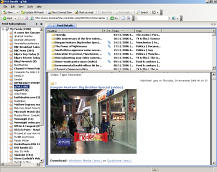
RSSBandit: (shown below) despite the name (ho ho!) this is another good RSS feed reader. It's opensource and has an integrated web browser (Internet Explorer).
FileZilla:
an open-source (free) FTP client for uploading or downloading files to and from
a server. This is the fastest FTP program I've ever used and is now my FTP program
of choice. A new version which is in beta (Jan 2007) will work on all platforms,
not just Windows.
FTPEdit: a free Windows program that allows you to open and edit files on a remote FTP server as easily as if they were on your local drive.
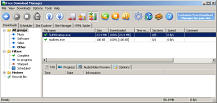
FreeDownloadManager: (shown below) a download accelerator and manager which lets you download a list of files or whole web sites. Completely free and a good piece of software.
CuteFTP: one of the best-known FTP clients. Get an old version such as 2.8.
Look@File: secure file transfer software. Fast and free. If you have a router you will probably need to open the relevant ports in the virtual server when using transfer software such as this.
HFS
(Http File Server): you can use HFS to send and receive files. Easy to get
running, small, works well and it's free. As with all software of this kind, if
you have a broadband router, you may need to adjust the firewall settings to give
HFS access to the internet.
Abyss web server: a small but feature-rich free web server for Windows, MacOS X, Linux and FreeBSD. I ran this on a Virtual Private Server for a while, hosting a site, and it was faster and easier than Apache.
RemotePad: edit html 'on the fly' by opening and saving directly to and from the server. Handy, though of course you should always keep a back-up copy of all your website files on your PC.
 Trillian:
integrate all of your instant
messaging clients -- ICQ, AIM Yahoo, MSN -- with this cool free software.
Trillian:
integrate all of your instant
messaging clients -- ICQ, AIM Yahoo, MSN -- with this cool free software.
Pidgin:
open source (free) software that integrates all the popular messaging clients:
ICQ, AIM, Yahoo, MSN, Jabber and does IRC too (remember that?). Available for
Windows and Linux. Formerly known as 'Gaim', Pidgin seems to use fewer resources
than Trillian and works pretty much the same, so I switched sometime ago.
ChillCam: run your own webcam. Highly configurable and fun. However, hasn't been updated in several years now.
Emule: a peer-to-peer file sharing client that improves on EDonkey. My tip is read up on how to configure it effectively with your router (certain ports need to be opened in your virtual server). That way you'll end up with a 'high' ID and your files will download more quickly.
Azureus: an open source BitTorrent client. BitLord is also worth looking at.
FileBox Extender: which is free, adds some extra buttons to the title bar at the top of the open and save file dialogs in Windows. These give a selection of user-set favourite and automatic last-used locations. Two other buttons let you roll up a window to just the title bar — which is handy if you want a quick look at something behind — and another 'pins' the window so it is always on top. Also FileBox Extender can be set to open the dialogs at a much larger size than standard.
Folder Guide: another free time-saving enhancement when working with files in Windows. It appears in the menu when you right-click in the open or save file dialog. You can choose from a list of destinations that you have set yourself.
File-Ex: this improves the Windows file open/save dialogue. It gives a larger file window, remembers the current folder and also recent and favorite folders and files. I used this for several years but it doesn't work with Vista unfortunately.
UltraVNC: this offers some improvements over WinVNC which I was using previously. It's client/server software that lets you remotely control a computer over any TCP/IP connection. Type in the IP address and the password, and the desktop of the other PC appears in a window on your screen. You can then work as if you were sitting in front of it. This is handy if you need to help a relative who has a PC problem. You can also use VNC on a home network to save you running between different PCs. Believe it or not, it's even usable over a 56k modem connection (I tried it) and it's completely free. One word of caution, be sure to choose a very secure password.
Stickies:
free 'Post-It' note software. Tiny and beautifully thought out. Post notes around
your screen instead of sticking real ones on the edges of your monitor. Hide them,
change the style and colour, set a note to pop up five minutes or a year from
now as a reminder. Send them to friends across your network, the Internet or by
e-mail. The best notes software around I reckon.
WinRoll:
'roll up' any window to just its title bar with a right-click, or keep any window
always on top. This is handy for anyone who works with lots of windows open at
once. WinRoll is tiny and completely free.
Total
Commander: I never launch
Windows File Explorer anymore, I use this fine replacement file manger. It has
many great features including FTP and server to  server transfer (if your server
supports it). The file renaming tool is superb and fast. If you like a slightly-old-fashioned
'business-like' look to your software (and I do) you will love this. Costs $34.
server transfer (if your server
supports it). The file renaming tool is superb and fast. If you like a slightly-old-fashioned
'business-like' look to your software (and I do) you will love this. Costs $34.
TrueCrypt:
Free open-source encryption software for Windows Vista/XP, Mac OS X, and Linux. Encrypt a 'container', partition or drive. Top quality software.
AxCrypt:
this integrates seamlessly with Windows to encrypt and decrypt files individually. Alternatively you can zip up a number of files before using Axcrypt.
ArsClip:
A lovely freeware utility that enhances the Windows clipboard. Arsclip can remember hundreds of copied snippets. You can also set groups of permanent items. Highly recommended.
FreeCommander: a free file manager similar to Total Commander above.
Roadkil's Unstoppable Copier: recovers files from disks with physical damage. Free and certainly works well for me.
SyncBack: synchronise files on two PCs or make back-ups. The free version will probably be fine for most people, though a pay-version with some extra features is also available.
JRes: (Windows 98 only) if you're working with video or designing web pages, often you need to change your screen resolution or colour depth. This little utility does it with one click. No need to open the Display Properties any more.
AVG Anti Virus: good free anti-virus software.
Avast anti-virus: excellent free anti-virus software that I use currently.
Sygate Personal Firewall: a free software firewall that I used until I switched to Windows Vista.
FinePrint:
lets you print several pages onto one sheet, delete unwanted pages, add headers
and footers or letterheadings, make booklets. It sits between your programs and
your printer and pops up whenever you print anything. Cool! $49.95.
iPrint: a free alternative to FinePrint.
PDFFactory: from the same people as Fineprint (above). 'Print' to this software and it turns whatever you send into a PDF document.
Bullzip
PDF Printer: this free software installs as a printer driver and makes great-looking
PDF documents from anything you print.
DoPDF: another good PDF creation program that installs as a printer driver.
CCleaner: use this to free up hundreds of megabytes of space. It deletes temporary files and all the other junk that builds up on your PC. It can also detect and fix various issues. When you install CCleaner you may wish to untick the option to install Yahoo! toolbar.
TreeCopy: an invaluable free utility that copies a directory (folder) structure without copying the files.
SuperAntiSpyware: very impressed with the free version of this anti spyware software.
RegCleaner: gets rid of old and obsolete registry entries.
RegSeeker: another registry cleaner to try out.
JkDefrag:
an alternative defrag tool for Windows. Very good.
3D Traceroute: check out the route from your PC to any website/server and find out where any delays occur. Free.
DriveImage XML: handy software for making a backup 'image' of a drive or partition. One of its most interesting and useful features is that it can backup a drive that is currently in use. Free for private use.
Imgburn: say goodbye to bloated CD and DVD burning software and hello to Imgburn which is neat, efficient and free.
HOME > > FAVOURITE SOFTWARE
© Copyright g7uk.com 2004-2024 | PRIVACY STATEMENT